
Note: this is for school administrator and teachers with permission to access Class.
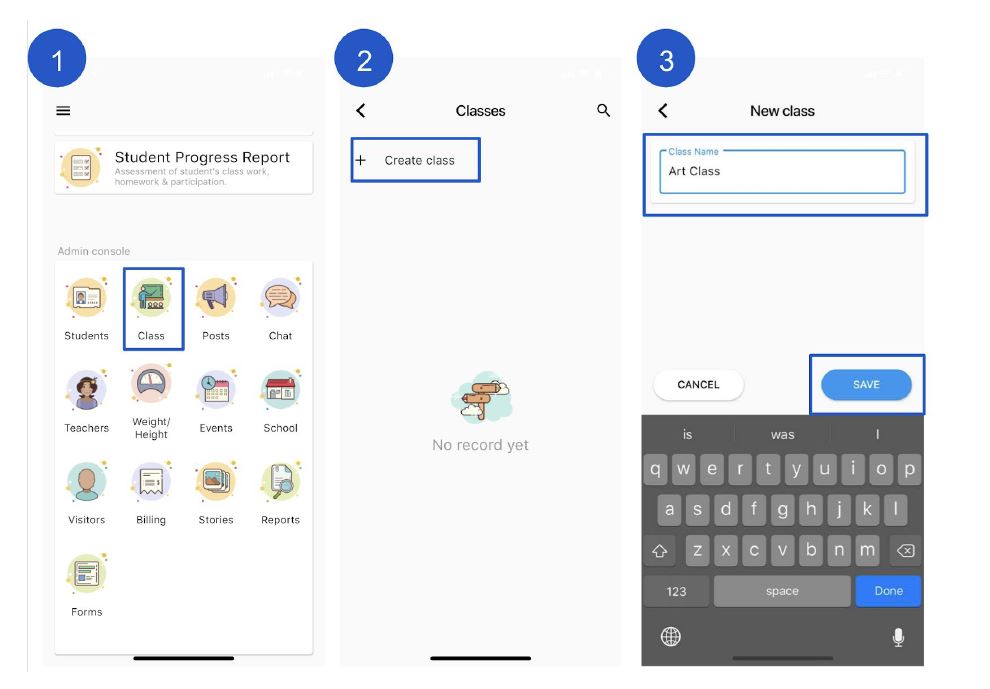
To create a Class #
Creating class is to help school to organise students and teachers by class. Therefore teachers are in-charge on the specific classes will be able to mark student attendance based on classes.
- From admin console section click Class.
- From the top click + Create Class.
- Enter your class name
- From the bottom right click Save.
How to add students and teachers in the class #
Creating class is to help school to organise students and teachers by class. Therefore teachers are in-charge on the specific classes will be able to mark student attendance based on classes.
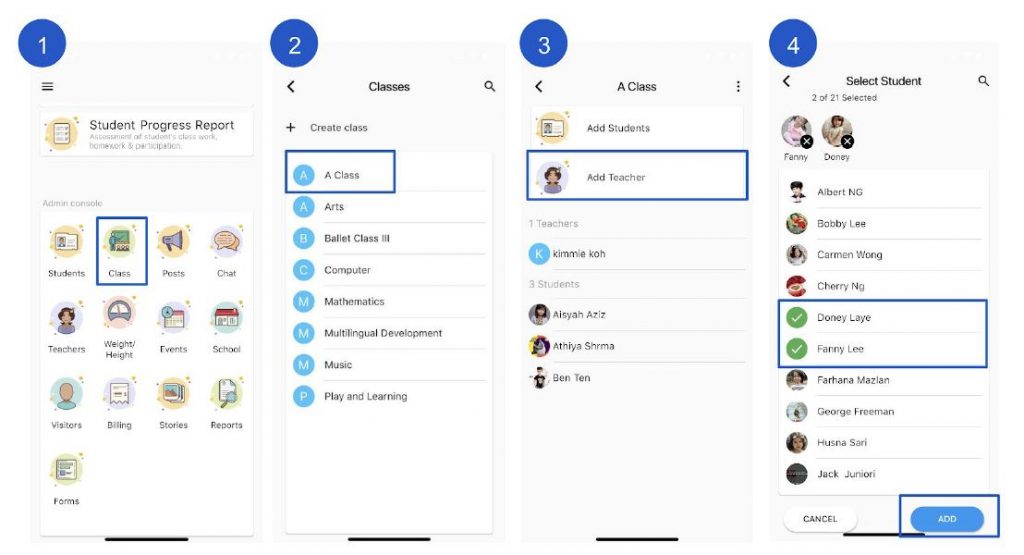
- From admin console section click Class.
- Click on selected class
- From the top click Add Students or Add Teachers
- Select students/teachers name
- From the bottom right click Add.
How to remove students and teachers from a class #
Creating class is to help school to organise students and teachers by class. Therefore teachers are in-charge on the specific classes will be able to mark student attendance based on classes.
- From admin console section click Class.
- Click on the selected class
- Click on the teacher or student name to remove from the class
- From the bottom click Remove to confirm.
How to change my Class name #
- From admin console section click Class.
- Click on the selected class
- From the top right, click
 and then Edit.
 - Rename the class.
- From the bottom click Save to confirm.
How to archive Class #
When you’re done teaching a class, you can archive it. When a class is archived, it’s archived for all students and teachers in the class. If you don’t archive a class, students and teachers in the class continue to see it on their Classes page.
You can restore an archived class if you want to use it again, or delete it if you’ll never use it again.
Admin or teachers with permission can archive a class. Students or parents can’t archive or delete a class.
- From admin console section click Class.
- Click on the selected class
- From the top right, click and then Archive.
- Confirm by clicking Archive
How to restore an archived Class #
When you restore an archived class, you see the class card again with your current classes.
- From admin console section click Class.
- Click on the selected class
- From the bottom, click Unarchive.
How to delete a Class #
When you decide you’ll never use a class again, you can delete it permanently. Admin or teachers with permission can delete a class. Students or parents can’t archive or delete a class.
Warning: There’s no way to undo deleting a class. If you click Delete, you no longer have access to any class details.
- From admin console section click Class.
- Click on the selected class
- From the top right, click and then Delete.
- Confirm by clicking Delete