
Note: this is for school administrator with permission to access the Teacher features.
Chat with Parents #
Chat in Oodlins allows school to instantly reach parents for any emergency. Parents are also able to use chat to contact the school on any enquiries. To start a chat with parents, school will need to add parent contact and details in student profile to proceed with the following steps:
- Click the Chat icon.
- From the top click + New Chat.
- Select the Student Name.
- Start Chat.
Note: Student’s name which parents that have registered on the Oodlins Parents app will only be visible
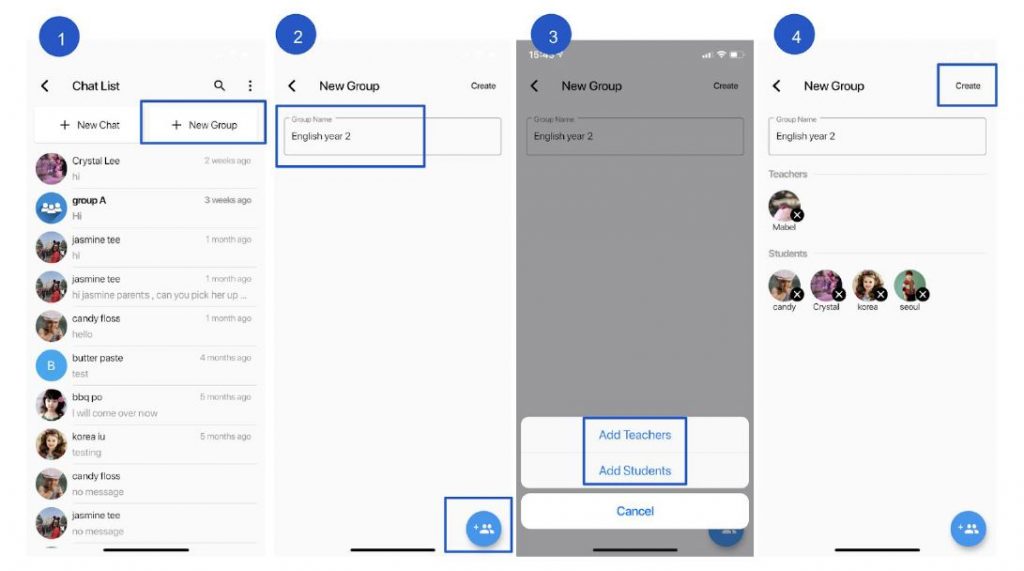
To create a group chat with parents and teachers #
Chat in Oodlins allows school to instantly reach parents for any emergency. Parents are also able to use chat to contact the school on any enquiries. To start a chat with parents, school will need to add parent contact and details in student profile to proceed with the following steps:
- Click Chat icon
- From the top click + New Group.
- Enter the Group Name and from the bottom left click on the add member icon.
- Add teachers and students in the group
- Click Create button to create group.
Include Teachers into Response list: #
To select teachers to be involved in the chat module, in the case when the teacher would like to chat with specific school teacher or authority (i.e. principal, accounts personnel) :
- Click Class icon
- From the top right, click
 and then Response List
 - Select teachers that are allowed to direct message with the parents.