
Table of Contents
Note: this is for school administrator with permission to access the Teacher features.
Invite Teachers into my School #
Adding school teachers in to Oodlins app is to allow teachers to take class attendance and share student’s information with parents.
- Click the Menu icon on the top left
- Click Invite Code
- Select Teacher’s Invite Code
- You will see there are several sharing platforms to choose to share the invite code. Select your preferred sharing platform, and send the school invite code to all new teachers.
- Inform all new teacher to download the Oodlins app from their phone’s app store (example: App Store, Google Play) and sign up with school invite code that you have just shared to them.

Add Existing Teacher #
Teacher who has an existing Oodlins account, would like to join your school.
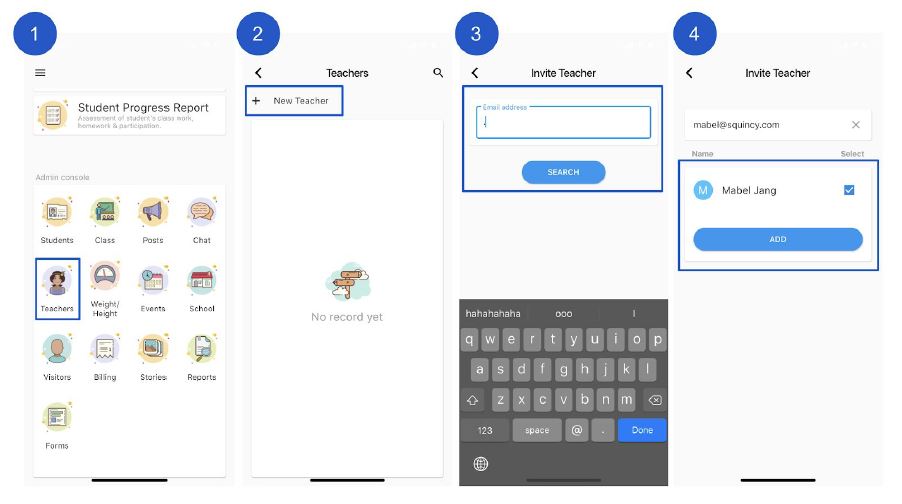
- Click Teachers
- Click + New Teacher
- Enter the teacher’s email address and click Search
- Confirm the teacher’s name and click Add
How do I remove a teacher from my school #
To remove the teacher from you school, you’ll need to be either an admin or have access to the Teachers module.
- From the home screen click Teachers
- Select the teacher to remove
- Click Remove confirm