
Table of Contents
Note: this is for school administrator and teachers with permission to access Posts.
The easiest way to share school updates, moments and announcements with parents. Posts is a whole-school messaging board. Posts will appear to parents connected to Oodlins Parents app. Most schools use their Posts for announcements, closure days, reminders for special events, etc. You can post images, videos, files, events or text directly on your mobile phone.
To make announcements to parents #
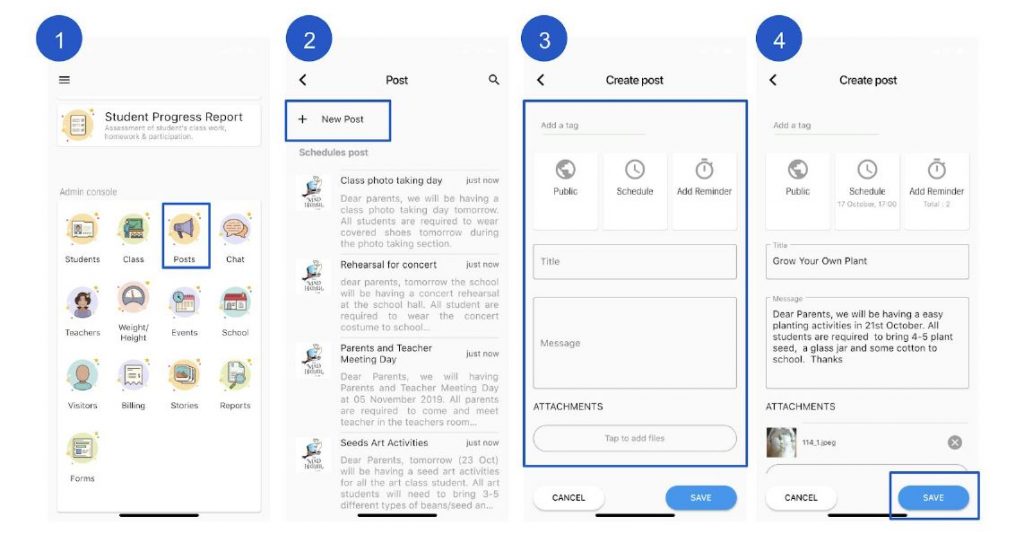
- From admin console section click Posts.
- From the top click + New Post
- Add a Title and Message you’d like to share.
- You can also:
- Add a media or pdf document
- Select a schedule
- Add reminder
- Select a tag
- Choose who can see your Post. You’ll have the option to:
- Public: Your post will show up to everyone in your school.
- Classes: Your post will show up to all the students in the selected class, including teachers.
- Specific people: Your post will be visible to your selected student(s).
- Click Post.
Features to add on your Post #
- Select post privacy status to be public / classes / private
- Schedule your posting date and time
- Add reminder notifications for the parents ( maximum 3 )